A beginner's field report · Rivals of Aether II Workshop
Porting Mollo to Rivals 2 with an AI
What it takes to turn a 2D fan-favorite into a 3D fighting game character, step by step. What the AI did, how it did it, and why a chat window alone could not have done it.
Character: Mollo, created by Giik, made official in Rivals of Aether (2021). Property of Aether Studios.Tools: Claude Code, Blender 5.2, TRELLIS, Grok image model, Rivals 2 Mod Kit (Unreal 5.8)Status: phase 1 finished (model, rig, 125 animations, 36 attacks). Phase 2 needs the Mod Kit.Date: 6 October 2026 · private build, not for publication
Chapter 1The goal
Rivals of Aether 2 is a platform fighter, like Smash Bros. Its developers released a free Workshop: a modding kit that lets anyone add characters to the game. The request was simple to say and big to do:
The request. "I want to port Mollo into Rivals 2 as a mod character. Read the documentation with attention and build everything. Ask me any questions you want, and take all your time."
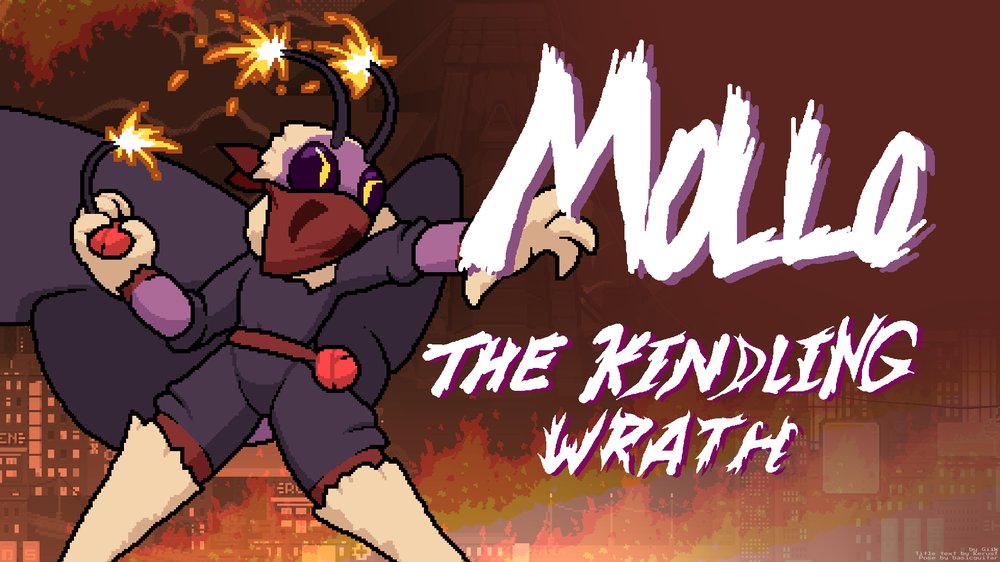
Mollo is a moth in riot gear from the first Rivals game. His antennae are lit fuses, he wears his wings as a tattered cape, and he fights with bombs. In the first game he was a 2D pixel-art character. Rivals 2 is a 3D game. So "porting" him means rebuilding him from scratch in 3D.
What a character mod is made of
If you have never modded a fighting game, here is the shopping list. Each item is explained in the glossary at the end.
A 3D model (the "mesh"): the shape of the character, about 50,000 triangles for a Rivals 2 character.
Textures: the images painted onto the model (colors, shading).
A skeleton (the "rig"): invisible bones inside the model so it can move.
Animations: about 95 movement states (idle, run, jump, get hit, hang on a ledge...) plus every attack. All at 60 frames per second.
Attack data: for each attack, when it starts hurting (frame by frame), where the hitboxes are, how much damage, which angle the opponent flies.
Scripts in the Lua language for anything special, like Mollo's bombs with their fuse timers.
All of this assembled in Unreal Engine, the engine Rivals 2 runs on, through the official Mod Kit.
A professional studio spends weeks or months on one character, with a modeler, a rigger, animators and a designer. This report shows how far one evening of work with an AI agent got.
195 cmheight in game, antennae included
23.9ktriangles
56bones, official naming
125animations at 60 fps
36attacks with frame data and hitboxes
≈ 0.19 $paid image generation (2 images)
Chapter 2Chat vs. agent
There are two very different ways to use the same AI model.
Claude (the chat). You type, it answers with text. It can explain, plan and write code. But it lives in a window. It cannot open your files, launch Blender, download anything, or see what its code produced unless you show it.
Claude Code (the agent). The same model, given tools: a terminal on your computer, your file system, a web browser, the ability to look at images. It writes a script, runs it, looks at the result, and fixes it. You stay in charge, and it asks before anything risky.
The loop that makes the difference
Almost every useful discovery in this project came from one cycle, repeated dozens of times:
1 · Writea Blender script (for example: move the legs into a kick)
2 · RunBlender in the background, no window, a few seconds
3 · Renderpictures of the result from several angles
4 · Lookthe AI opens the pictures, spots what is wrong, goes back to 1
↻ about 45 Blender runs in this project
In a chat, you would be steps 2, 3 and 4: copy the script, paste it into Blender, take screenshots, upload them, describe what you see, copy the next fix. Possible, but slow, and error-prone for a beginner who cannot yet tell a weight-painting bug from a bone-placement bug.
Side by side
Task in this project
Claude chat
Claude Code
Read the 50 pages of Workshop docs
Partly: with web access, page by page
Yes, then kept them as working notes
Check what is installed on your PC
No
Yes: found Rivals 1 and 2, Blender, Steam folders
Download the official reference skeletons
No
Yes, after asking you
Generate concept art, turn it into 3D
No (it can write the prompt)
Yes: called the image API and TRELLIS
Write the Blender scripts
Yes
Yes
Run them and see the result
No: you run them, you send screenshots
Yes, headless, then looks at its own renders
Find and fix the 10 bugs of chapter 5
Only through your screenshots, one round trip each
Yes, each one in minutes
Bake and export 125 animations
No
Yes, 1 minute 20 per full rebuild
Log into Epic, click inside Unreal
No
No: your accounts, your clicks
Play the character and judge the feel
No
No: only a player can
Be fair to the chat. A patient beginner with a chat AI could reach the same result. They would have to run every script themselves, describe every render, and catch every mistake by eye. The model's knowledge is the same; the hands and eyes are what change.
Chapter 3The build, step by step
Step 1 · doneRead the docsWorkshop guide, frame data, the original mod
Step 2 · doneAsk questions2D or 3D? Private or public? Who installs what?
Step 3 · doneConcept artFront and back, A-pose
Step 4 · doneImage → 3DTRELLIS builds a textured mesh
Step 10 · to doImportMesh, animations, materials, hurtboxes
Step 11 · to doLuaBombs, fuse, flare gun aim
Step 12 · to doPlaytestBalance the knockback
Step 1 · Read before touching anything
The AI read the official Workshop documentation: installation, the 3D character pipeline (model, rig, animation, textures, export), attacks, throws, articles (projectiles), file naming, and the list of known bugs. It also found the frame data of every Mollo attack on Rivals Academy, a community wiki, as a clean data file (YAML).
Then it checked the computer: Rivals 1 and Rivals 2 were installed, Blender 5.2 too, but not the Mod Kit. It also noticed that Mollo's original sprites are locked inside the Rivals 1 game file, because he is now an official character.
Step 2 · Ask the human the real decisions
An agent should not guess what only you can decide. It asked four questions before building anything:
Visuals: extract the original 2D sprites (fast, but they belong to the studio), redraw in 2D, or go full 3D? Answer: full 3D.
Goal: private play with friends, or public Workshop upload? Answer: private. This matters legally: Mollo belongs to Aether Studios and his creator Giik.
Mod Kit: can you install it now? Answer: later. So phase 1 stays inside Blender.
Scope: everything at once, or in phases with tests between them? Answer: phases.
It then asked permission before spending money (image generation) and before downloading the official reference files.
Step 3 · Concept art
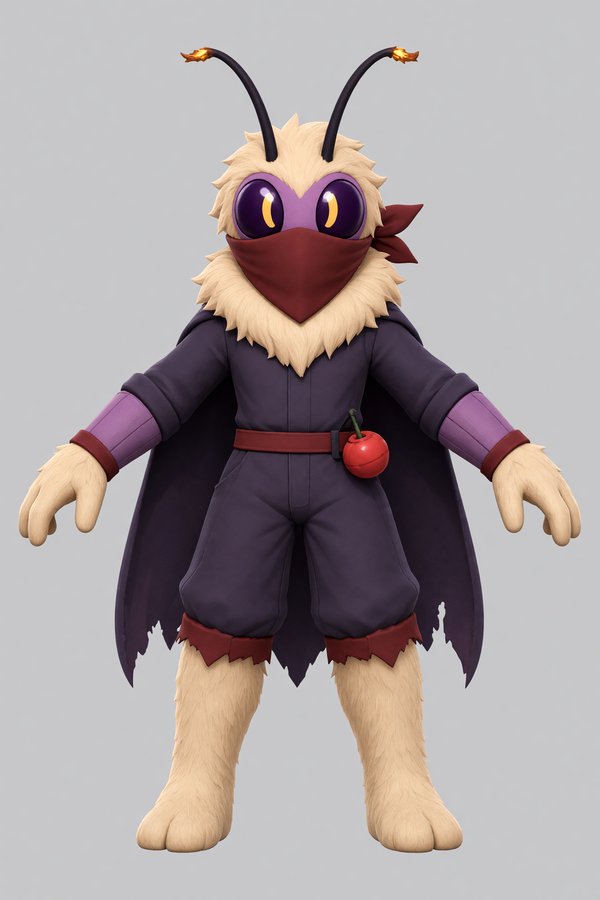
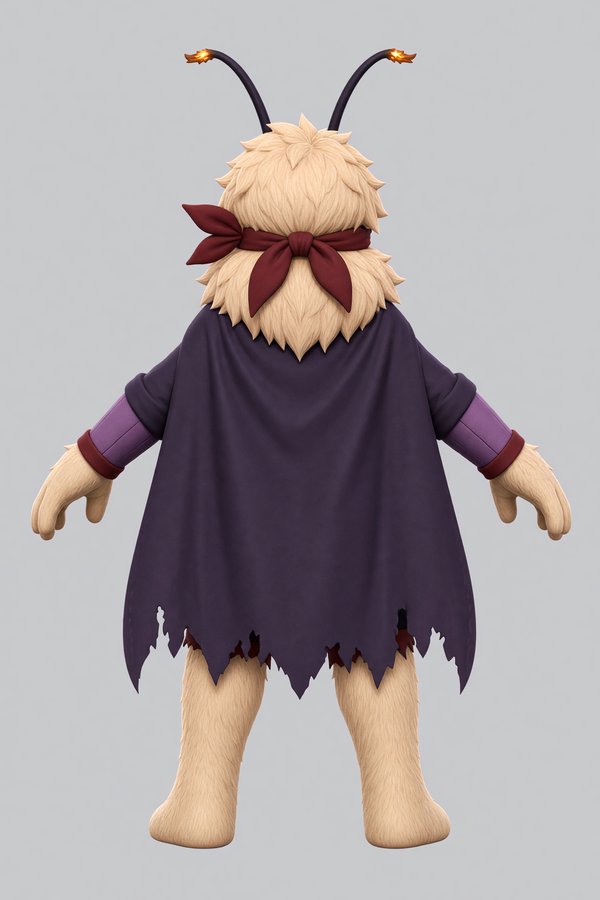
A 3D generator needs a clean picture: one character, front view, arms away from the body ("A-pose"), plain background. The AI sent the original Rivals 1 key art to an image model (Grok, through the Higgsfield API) with a detailed description. Then it asked for the back view, using the front as reference so both match. Cost: about 19 cents.
The source: Giik's original key art.Generated back view, matching the front on the cover.
Step 4 · From picture to 3D model
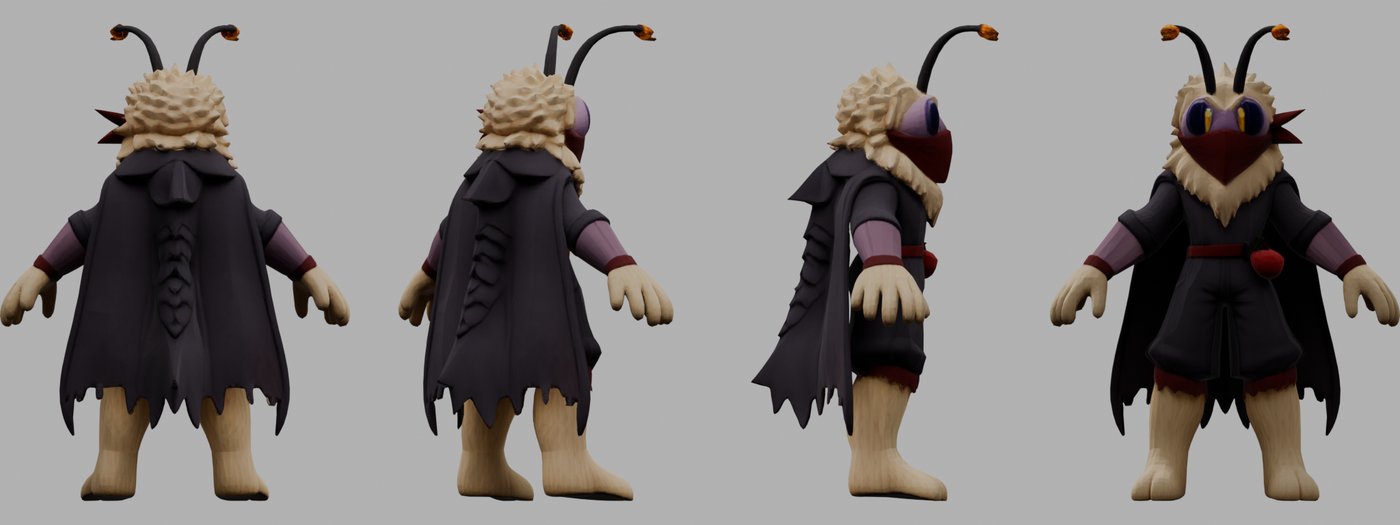
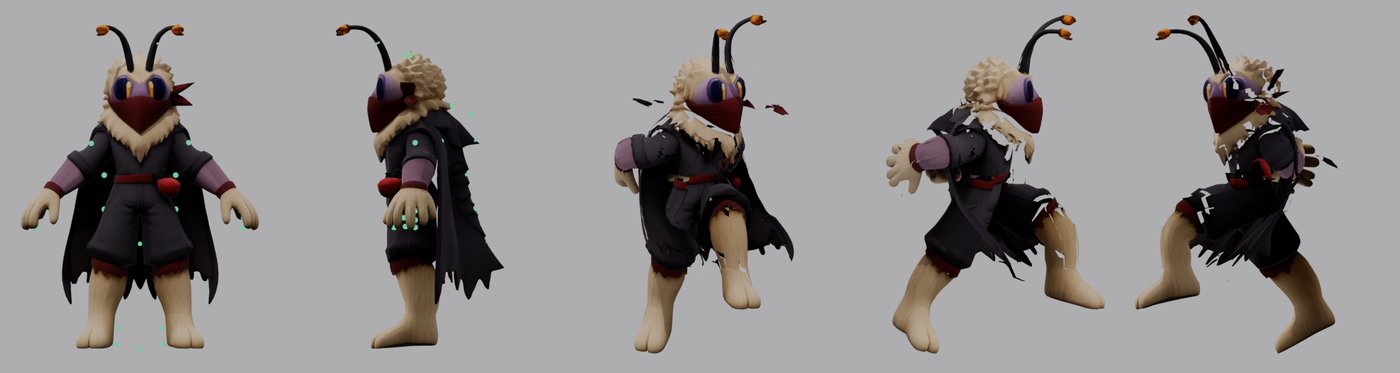
TRELLIS is a free research model hosted on Hugging Face. It takes images and returns a textured 3D model. Given the front and the back, it built Mollo in about two minutes: 23,000 triangles, half of the Workshop budget.
The raw TRELLIS model. Back, three-quarter back, side, front. Note that it faces the wrong way: the first thing to fix.
The AI then measured the model against the docs: Rivals 2 wants characters facing a specific direction, standing on the ground, in centimeters, around 180 to 200 cm tall. It also opened the official reference skeletons of Zetterburn and Wrastor and read their bone names, so Mollo uses the same conventions as the real cast.
Step 5 · The skeleton, and seven attempts
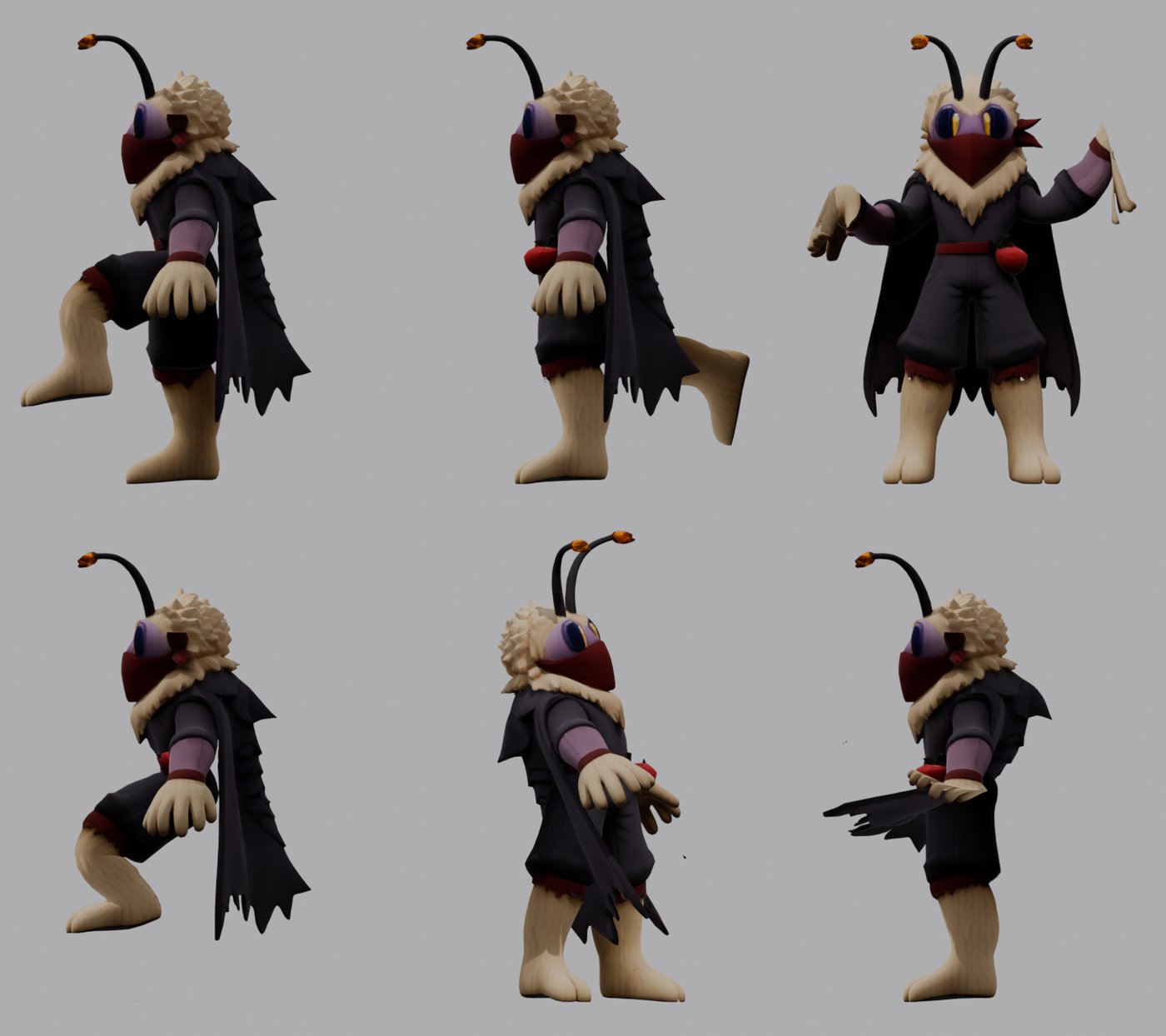
Rigging means placing bones inside the model and deciding how much each bone pulls each point of the surface (the "weights"). This is where most beginners get stuck, and where the write-run-look loop earned its keep. The AI built a test that poses Mollo in six extreme ways (kick, leg back, arms up, crouch, twist, cape flap) and looked at the result after every change.
Attempt 1: the model tears apart at every joint.Attempt 7: all six tests deform cleanly. Chapter 5 explains what went wrong in between.
Step 6 · Animation as data
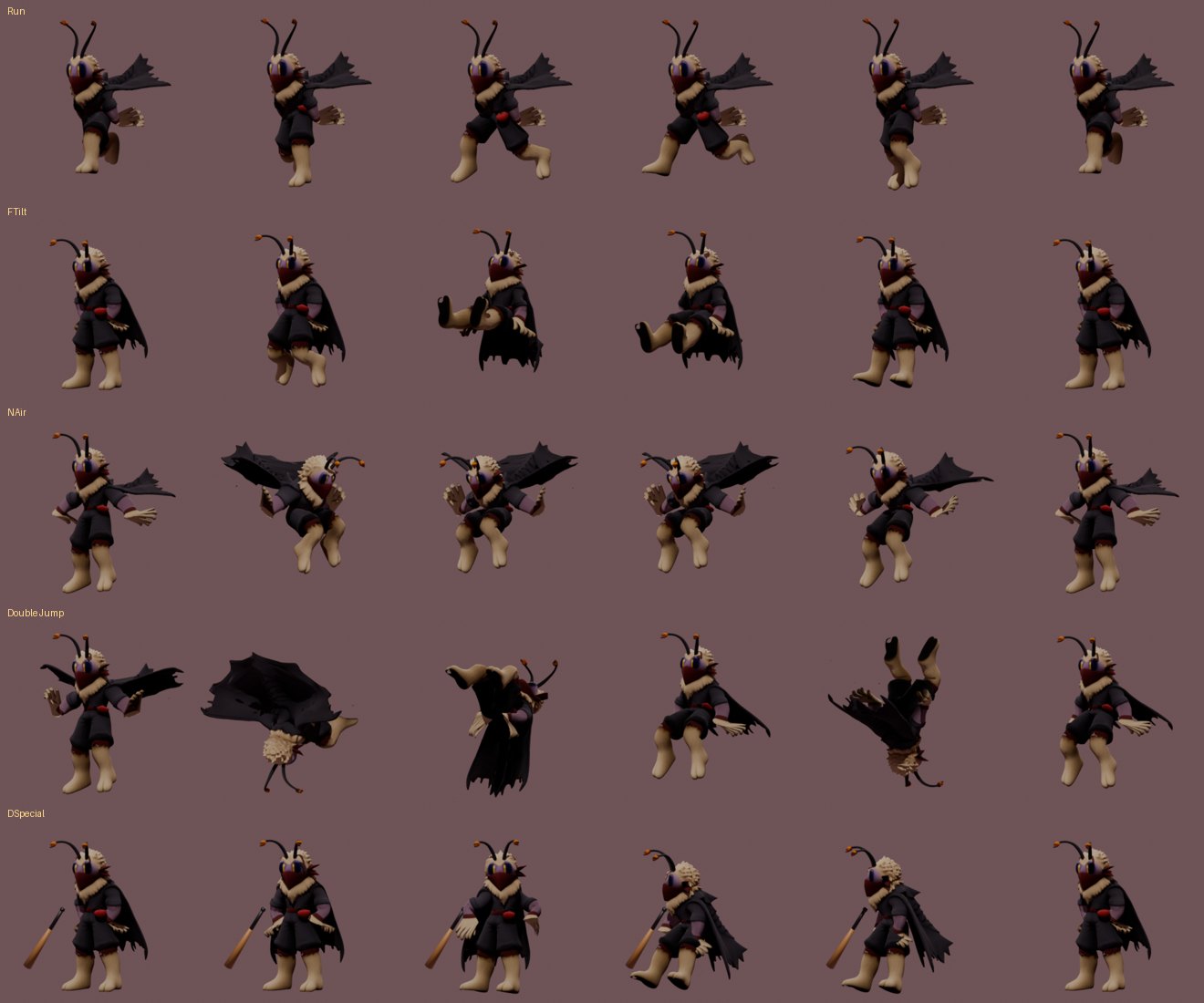
Animating 125 states by hand in Blender would take weeks. Instead, the AI described each pose as a short list of rotations, in plain directions: "lift the left thigh 75 degrees forward, bend the knee 80". A script turns these lists into keyframes. Three tricks made it work:
Mirroring: write the left arm, the right arm is computed automatically.
Planted feet: when Mollo crouches, the feet must stay on the floor. A technique called IK (inverse kinematics) bends the knees automatically to keep them there.
Baking: the result is converted into plain bone movements, the only format Unreal reliably imports.
Six frames each from Run, F-tilt, N-air (cape spin), double jump (flip with the cape opened like wings) and the baseball bat special.
The movement set covers every state the docs list: walking, running, jumps, shields, rolls, getting hit, lying on the ground, hanging on ledges, being grabbed, holding items. These are first-pass animations, which the docs call "gameplay quality": clear poses and correct timing, not yet polished.
Step 7 · Attacks: frame data and hitboxes
In a fighting game, timing is everything. Mollo's first jab hurts on frames 6 and 7, then he needs 12 frames to recover. Each attack was built from the original numbers, so every animation lasts exactly as long as in Rivals 1:
Attack
Startup / active / recovery
Damage
What Mollo does in 3D
Jab 1
5 / 2 / 12 frames
3 %
Quick left punch
Forward tilt
9 / 5 / 21
9 %
Straight riot-boot kick
Neutral air
6 / 4 + 6 / 11
2 + 5 %
Spin with the cape-wings open
Up strong
13 / 4 hits / 26
2+2+2+5 %
Firework fountain over his head
Down special
38 / 3 + 3 / 22
6 / 11 / 16 %
Baseball bat, sweet spot at the tip
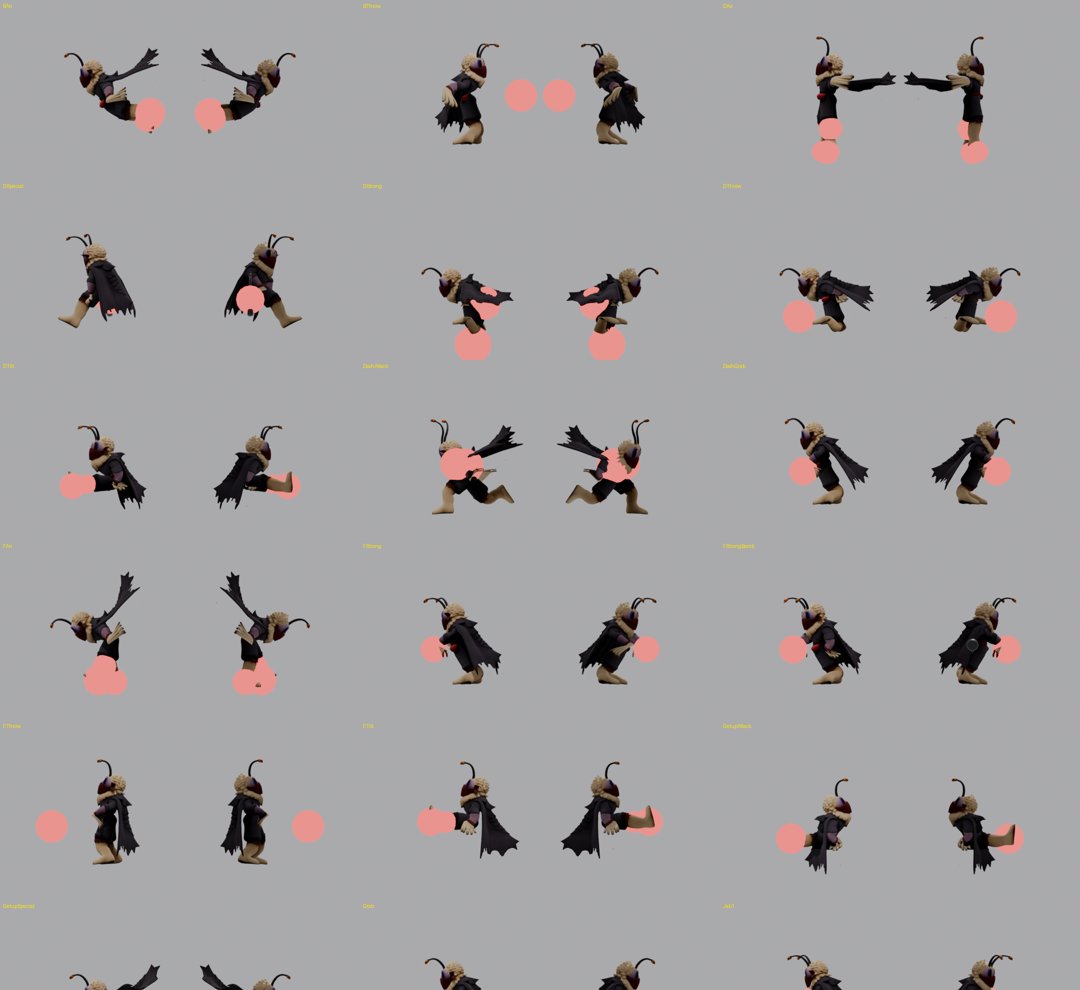
A hitbox is an invisible sphere that hurts whoever touches it. Each one was attached to a bone (a fist, a foot, the bat) with a size in centimeters. Then the AI rendered every attack at its active frame with the hitboxes drawn in red, from both sides, to check they sit where the hit visually lands.
Hitbox check: red spheres on the active frame of each attack, seen from the left and the right.
Step 8 · Export
Finally, everything was exported with the exact settings from the docs: one FBX file for the model and skeleton, one for the 125 animations, four textures with the official name suffixes, and an entry sheet listing every number to type into Unreal for the 36 attacks. Every step is a script, so changing one pose rebuilds everything in about a minute and a half.
Chapter 4What still needs you
Even an agent with tools hits walls. These are the parts of the project that stayed (or will stay) human.
Your accounts. The Mod Kit installs through the Epic Games launcher with your login. Publishing goes through your Steam account. An AI should never handle your passwords.
The Unreal editor. Importing, assigning materials, drawing hurtbox capsules and filling the attack assets happen in a graphical editor. The AI prepares every number and file, and you click.
Hidden documentation. The Lua scripting reference is only visible inside the Mod Kit, not on the website. The bomb system waits for it.
Game feel. Is the jab too slow? Does the bat feel heavy enough? Only playing tells you. The knockback values are copied from Rivals 1 and will need balancing.
Taste. You chose 3D over 2D, private over public, phases over a big bang. Those were your calls, and the AI asked instead of guessing.
Rights. Mollo belongs to Aether Studios and Giik. The Workshop docs ask you not to publish an imported character without the creator's permission. This build stays private.
Next steps (phase 2). Install the Mod Kit close to a drive root (for example G:\R2ModKit) and let it compile shaders, which can take an hour. Then the AI reads the Lua docs and engine files from disk, prepares the import, and writes the bomb system: four bomb types chosen by direction, a 120-frame fuse, the flare gun that detonates them, and the bat that launches them.
Chapter 5The bug log
Things go wrong, even for an AI. Here is every problem found during the build. None could have been spotted by reading code alone: each one appeared in a render. This list is the real argument for an agent that can see its own results.
Torn mesh
The model ripped apart at every joint.
TRELLIS outputs the surface in separate pieces along its texture seams, so each piece moved on its own. Fix: weld the pieces before attaching the bones (16,000 points down to 11,500).
Cape glued to legs
When Mollo kicked, the cape stretched into a sail between his leg and the floor.
The generator had fused cape and legs into one surface. Fix: from every point, shoot a ray toward the leg bone. If it crosses another surface first, that point is cape, not leg.
Bones outside the legs
The leg bones were placed along the inner edge of the legs.
The first estimate (13 cm from the center) came from the concept art. Measuring the cream-colored fur on the model gave 24 cm. Fix: place bones from the measured fur.
Sideways knees
With planted feet, the knees pointed sideways and the legs twisted.
A trial-and-error search for the knee direction found inconsistent values. Fix: compute it with the standard formula instead.
Wrong lean
The first crouch looked like sitting on a chair. The running cape stuck out in front.
For the same rotation, bones pointing up (spine) and down (legs, cape) move in opposite directions. Fix: write the rule at the top of the pose file and flip the signs.
Late punches
Hitboxes appeared at belly height, arms not yet extended.
The strike pose was reached at the end of the hitting window instead of the start. Fix: the arm snaps into the strike on the first active frame, as in real fighting games.
Mirror mistake
The flare gun pointed at the floor; the rocket was grabbed with one hand down.
Three right-arm poses were written with the left arm's directions. Fix: audit every right-side pose.
Frozen opponent
Throws would not move the grabbed opponent.
The special bone that carries the opponent (Grab_M) was never animated. Fix: give each throw a hold and a release position.
Black props
The bomb, bat, can and gun texture came out fully black.
An image created by a script is lost when the file is saved, unless it is packed inside. Fix: pack it, and protect it from the shadow-baking step.
Still open
The bat is held along the forearm instead of across it. The hanging-on-ledge position is a guess until it can be compared with a real character in the editor.
Chapter 6Do it yourself
You want to mod your own character? Here is the path, assuming you have never done it.
Install the tools: Steam with Rivals 2, the Epic Games launcher and the Rivals of Aether II Mod Kit, Blender, and Claude Code.
Make an empty folder for your character and open Claude Code in it.
Give it the sources: the Workshop docs link (rivals2.com/workshop) and anything about your character: drawings, a wiki page, a frame data sheet.
Ask it to read first and ask you questions. Answer them carefully: 2D or 3D, private or public, what you install yourself.
Choose the easy road if it exists. If your character already exists as a Rivals 1 Workshop mod, the Mod Kit can import it as a 2D character almost automatically. 3D is far more work.
Demand pictures. Ask for a render or a contact sheet after every step. You do not need to understand the code; you need to see whether the kick looks like a kick.
Work in phases. Movement first, then normal attacks, then specials. Test in game between phases.
Keep it reproducible. Ask for scripts rather than one-off clicks, so any fix rebuilds everything.
Respect ownership. If the character is not yours, keep the mod private unless the owner says yes.
Set expectations. AI got this character from nothing to a full set of game-ready files in one evening. That does not make it a finished character. Generated models need cleanup, script-made animations look stiff next to hand animation, and only playtesting tells you whether the character is fun. Treat the AI as a fast, tireless assistant that still needs your eyes and your decisions.
AppendixGlossary
Mesh
The 3D shape of a character, made of thousands of small triangles.
Texture
An image wrapped around the mesh to give it color. UVs tell which part of the image goes where.
Rig / skeleton
Invisible bones inside the mesh. Moving a bone moves the part of the mesh attached to it.
Weights / skinning
How strongly each bone pulls each point of the mesh. Bad weights cause tearing and stretching.
A-pose
Standing straight, arms angled away from the body. The standard pose for building a model.
Keyframe
A pose saved at one moment. The computer fills in the frames between keyframes.
IK / FK
FK: you rotate each bone yourself. IK (inverse kinematics): you place the hand or foot, and the computer bends the elbow or knee.
Bake
Convert any clever setup (IK, constraints) into plain bone positions for every frame.
FBX
A common file format for sending models and animations from Blender to a game engine.
Frame / 60 fps
The game updates 60 times per second. Fighting games count everything in frames.
Startup / active / recovery
The three phases of an attack: winding up, hurting, recovering. Measured in frames.
Hitbox / hurtbox
Hitbox: the area that deals damage. Hurtbox: the area where a character can be hit.
BKB / KBS
Base knockback and knockback scaling: how far a hit launches, and how much more at high damage.
Strong attack
A chargeable smash attack. Holding the button makes it stronger.
Article
Rivals term for an object a character creates: projectiles, bombs, traps.
Lua
The scripting language the Workshop uses for custom behavior.
Unreal Engine
The game engine Rivals 2 is built on. The Mod Kit is a customized Unreal 5.8.
TRELLIS
A research AI that turns one or more images into a textured 3D model.
Headless
Running a program without its window, controlled entirely by a script. This is how the AI drove Blender.
Agent
An AI that can use tools (files, terminal, browser) to act, check its results, and correct itself.
Sources: Rivals 2 Workshop documentation (rivals2.com/workshop) · Rivals Academy frame data for Mollo, patch 2.1.5.6 (rivals.academy/library/mollo) · Mollo by Giik on the Rivals of Aether Steam Workshop (item 1871989159). Mollo and Rivals of Aether are property of Aether Studios. This document describes a private, non-distributed mod.